Discord hands out orbs.
This collects them for you.
Quests turn into orbs, and orbs buy Nitro, avatar decorations and profile effects. Orb Farmer collects them in the background. Come back, build a matching profile, and save your favorite looks for next time.
Free to download · Free for a week · See the price
Windows will say “Windows protected your PC” the first time you run the installer — choose More info, then Run anyway. It says that about any installer without a code-signing certificate. They cost a few hundred a year, which our current budget does not cover yet.
Choose .deb for Ubuntu/Debian or .rpm for Fedora. Arch Linux uses .pkg.tar.zst with Pacman. Keep your desktop keyring unlocked to save a login. Installation help
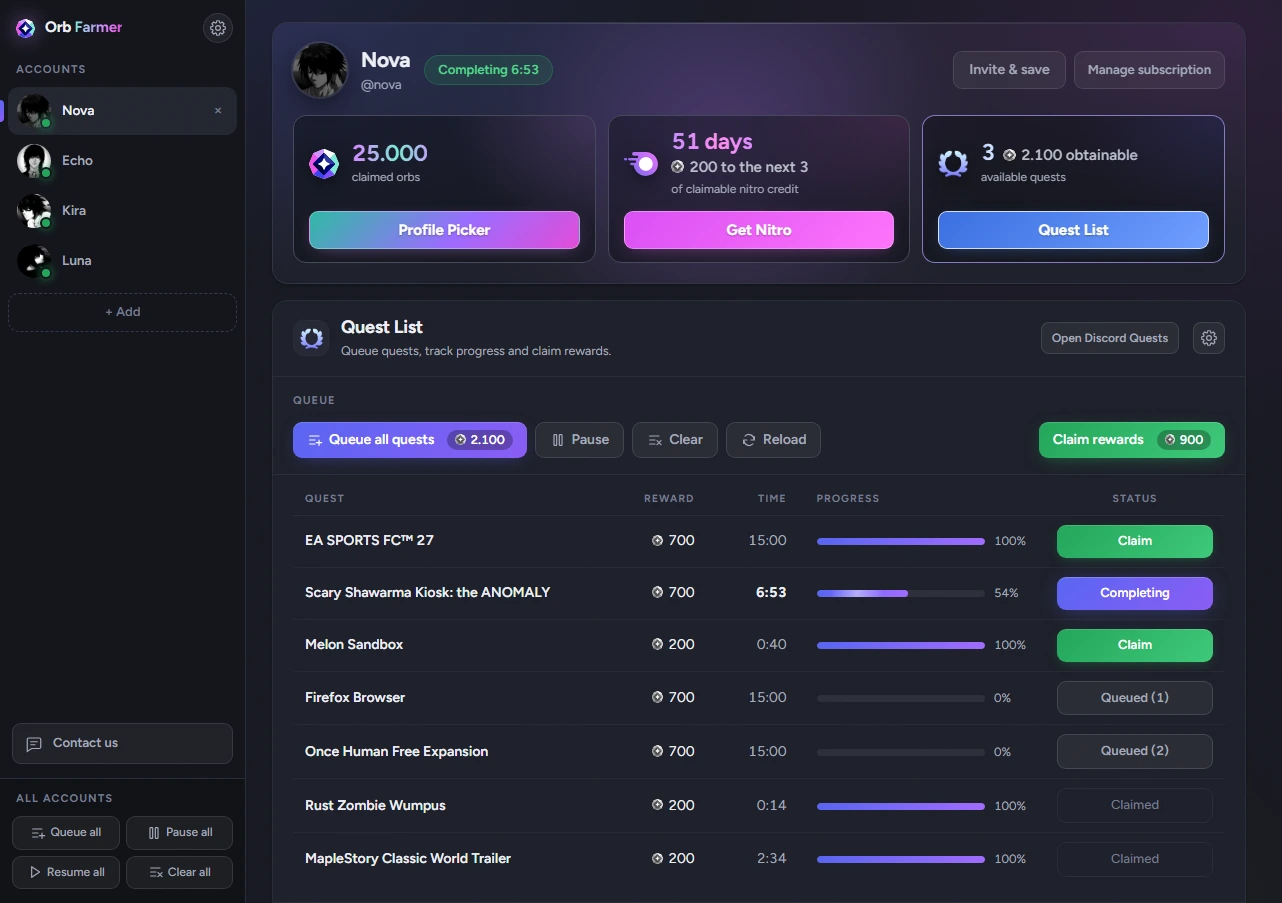
Your quests, your balance, your next look. All in the same window.
What it does
Three things, none of which you have to watch
You add a Discord account, and the app takes it from there. There is nothing to configure and nothing to keep an eye on.

Quests finish themselves
Press Queue all quests and walk away. The app works through them one at a time in the background — no videos to sit through, no games left running.
The balance adds up
Each account gets its own panel: orbs claimed, orbs still on the table, and how much Nitro that is worth so far.

Make them part of your profile
Put them toward Nitro, or browse decorations, effects, nameplates and frames in Profile Picker. Try a look before you decide what to buy.
Profile Picker
A profile to match your mood
Try decorations, effects, nameplates and frames together. Add your own picture and banner, find the right colors, and see the whole look before you equip it.
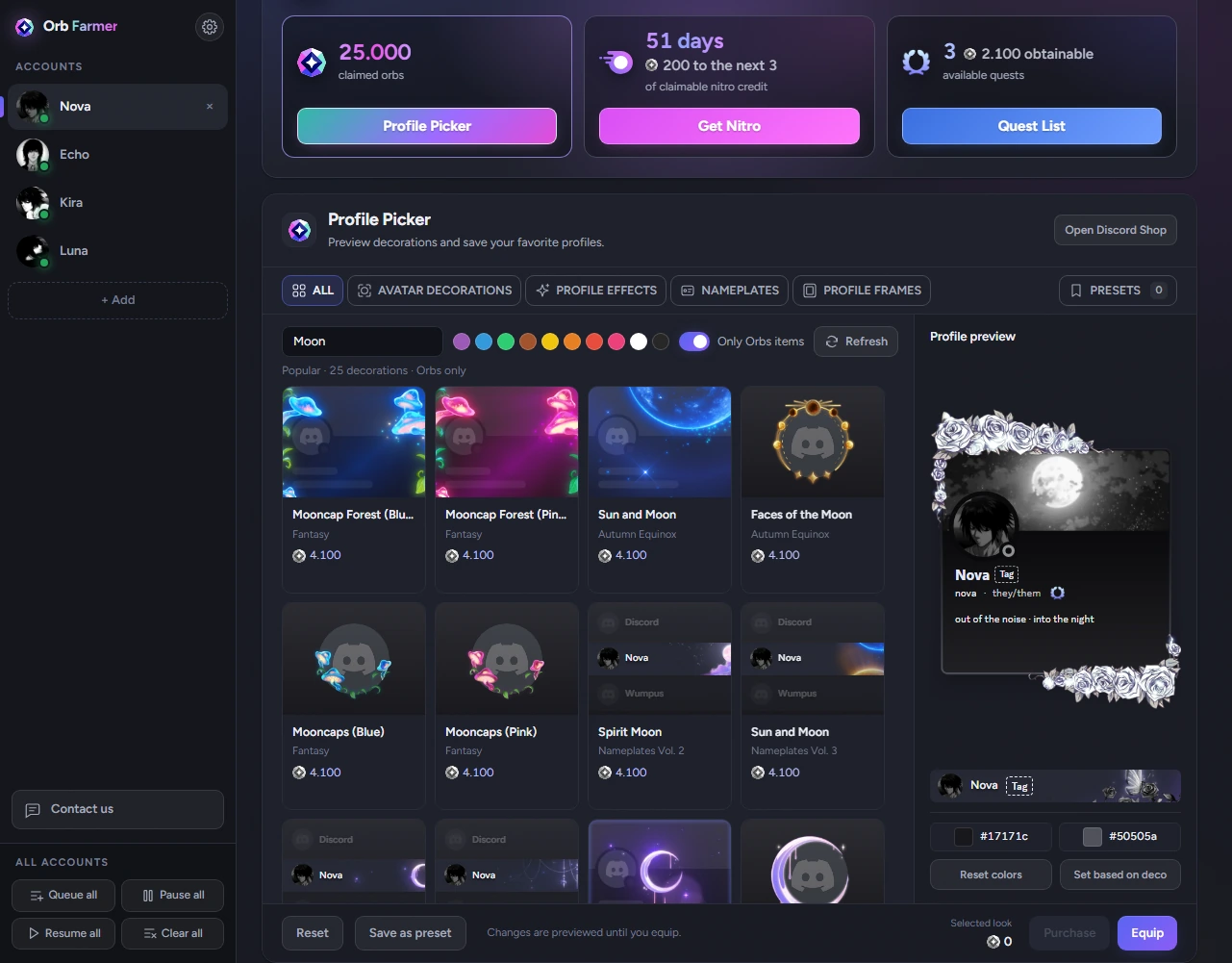
Find what fits
Search the Shop, filter by color, or show only things you can buy with Orbs.
Keep your favorite looks
Save a complete profile as a preset. Switch back whenever you feel like it.
Choose, then confirm
Equip what you own, or check the Orbs total before buying the missing pieces.
A closer look
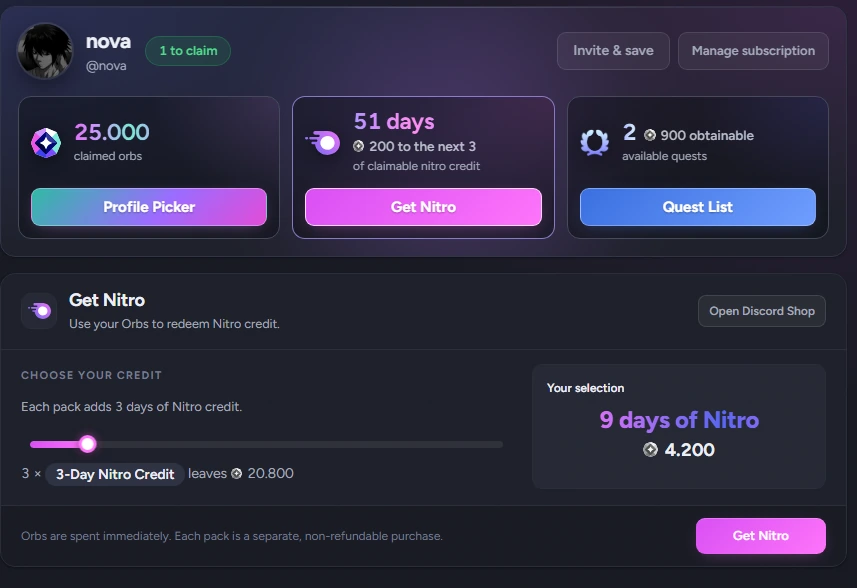
Spend them without leaving the app
Nitro is a slider and a button, because the app already knows what the balance is worth. Choose how much credit you want and confirm the Orbs total. Profile Picker handles Orbs decorations too, and Discord's own Shop is still a click away.
- It runs quietly. Nothing sits on your screen or in your taskbar; it asks for you only when Discord does.
- As many accounts as you like. Each one gets its own panel, and its own licence.
- Your queue, your way. Keep the default quest settings or choose different ones for each account.
Price
One licence, one Discord account
The app is free to download and free to look around. A licence is what makes an account run — and the first week of it is free.
First 7 days free, once per Discord account. A card is taken when the trial starts and charged when the seven days are up — cancel before then and you pay nothing.
- One Discord account
- Cancel any time — it runs to the end of the month you paid for
- Renews itself until you say otherwise
- $23.88 billed once a year
- One Discord account
- Cancel any time — it runs to the end of the year you paid for
- $12 less per year than paying monthly
These prices apply to new subscriptions. Existing subscriptions and trials keep their current prices. Payments go through Link, a Stripe company, so card details never reach this site or the app. Running several accounts means a licence for each, and you can cancel any of them from inside the app.
Questions
The ones worth asking
What can I spend the orbs on?
Whatever Discord sells for them: Nitro, avatar decorations, profile effects, nameplates and profile frames, when they are available for Orbs. Use Get Nitro for credit, or Profile Picker to preview and buy Orbs decorations. Cash-only items open in Discord's own Shop.
Can I save a profile before I own the decorations?
Yes. A preset can include things you have not bought yet. When you are ready, the app shows the missing items and asks you to confirm any Orbs purchase. Applying a look follows Discord's ownership and Nitro requirements. Saving or previewing it does not spend anything.
Can I run more than one account?
As many as your PC can comfortably hold, all from the same window. Each account needs its own licence.
Where do my Discord login details go?
They stay on your computer, encrypted with your operating system's key store. We do not keep them, and the site never sees them at all.
Does the app have to stay open?
Yes — the work happens on your machine, so leave it running and it gets through the queue. It can start when you sign in and sit in the background from then on.
Is the free week really free?
Yes, and you do have to put a card in to start it. Nothing is charged for seven days; the app tells you every day how many are left and the date the first payment falls on. Cancel before that date and no money moves. The card is there because otherwise the free week would be one per Discord account rather than one per person, and Discord accounts are free.
What happens if I cancel?
The account keeps running until the end of the period you have paid for — or, during the free week, until the week is up — and then stops. Nothing is deleted: your accounts, your orbs and your Nitro are exactly where you left them, and paying again picks up where it stopped.
What if my internet drops?
A saved licence can bridge a temporary outage of our licence service. Discord quests still need an internet connection.
What does the licence include?
Every quest here is one you could do yourself — sit through the video, leave the game open, come back, claim. The app does the waiting, then gives you one place to turn the balance into Nitro and build your next profile.
Quest farming, Profile Picker, reusable presets and Nitro redemption are included, along with updates and support. Each licence covers one Discord account. Nitro and decorations are separate rewards bought with your Discord Orbs; the licence does not include them.
Windows says the file isn't safe. Is it?
That screen — “Windows protected your PC” — is SmartScreen, and it appears for any installer that hasn't been signed with a code-signing certificate. It is about the certificate, not about the file: choose More info, then Run anyway. Certificates run a few hundred a year, and reputation with SmartScreen has to be earned on top of that, so it will keep appearing for a while yet.
Which systems does it support?
Windows 10 and 11, and Linux for Ubuntu/Debian, Fedora and Arch Linux, all for 64-bit Intel and AMD computers. Linux is tested on Ubuntu 24.04, Fedora 44 and Arch Linux; other distributions may need extra setup. There is no Mac version yet.
How do I install it on Linux?
Choose .deb for Ubuntu/Debian, .rpm for Fedora, or .pkg.tar.zst for Arch Linux. Open the .deb or .rpm download
in your software installer. On Ubuntu/Debian, you can also run
sudo apt install ./orb-farmer-linux-amd64.deb from its folder.
On Fedora, use sudo dnf install ./orb-farmer-linux-x86_64.rpm.
On Arch Linux, use sudo pacman -U ./orb-farmer-linux-x86_64.pkg.tar.zst on an up-to-date system.
Keep your desktop keyring unlocked to save a login.
Start with one account
Download it, add an account, and licence it whenever you want it running.
Windows 10/11 · Ubuntu 24.04 · Fedora 44 · Arch Linux
64-bit Intel/AMD
Windows will say “Windows protected your PC” the first time you run the installer — choose More info, then Run anyway. It says that about any installer without a code-signing certificate. They cost a few hundred a year, which our current budget does not cover yet.
Choose .deb for Ubuntu/Debian, .rpm for Fedora, or .pkg.tar.zst for Arch Linux. Use your software installer for .deb/.rpm, or see the terminal installation commands. Keep your desktop keyring unlocked to save a login.
Worth knowing before you buy: automating quests is not something Discord's terms allow for, so there is a small risk attached to any account you run it on. Small, not zero — that is the honest version, and the terms spell out the rest.